Mac app for rekordbox DJs
Any song list, turned into a rekordbox playlist in minutes.
Paste a list, drop a screenshot or share a Spotify link. setlist finds every track in your own library and builds the playlist for you.
macOS 12+ · Apple silicon & Intel · No account required
MATCHING LIBRARY0 / 45,000 tracks
How it works
Three steps from request to ready.
Import
Paste track names, drop screenshots anywhere on the window, or add a public Spotify link.
Match
Every track is matched to the files on your drives. Anything uncertain is flagged for a quick review.
Export
One click creates a rekordbox playlist that points to your existing files. Nothing is moved or copied.
Features
Matching you can trust before a show.
Built around the way requests really arrive: messy, mixed-language and rarely complete.
Title and artist, both checked
A matching title by the wrong artist is never accepted automatically. Small spelling differences in titles are handled.
Review close matches at once
See each request next to the file chosen for it, approve them together, or swap any one.
Best copy, automatically
When a track exists more than once in your library, the higher-quality file is selected.
A clear download list
Tracks not found in your library are exported as a list, so you know exactly what to get.
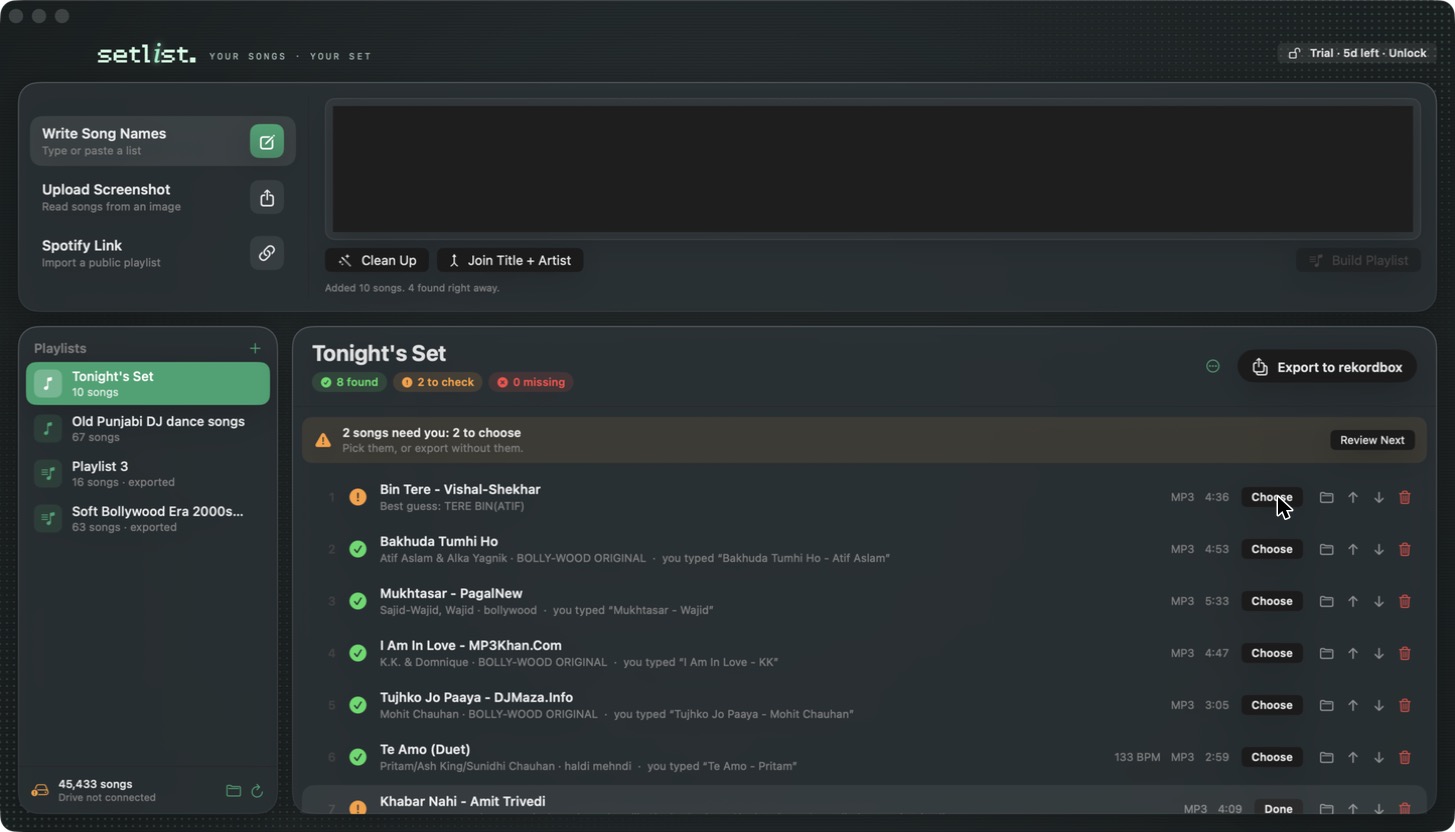
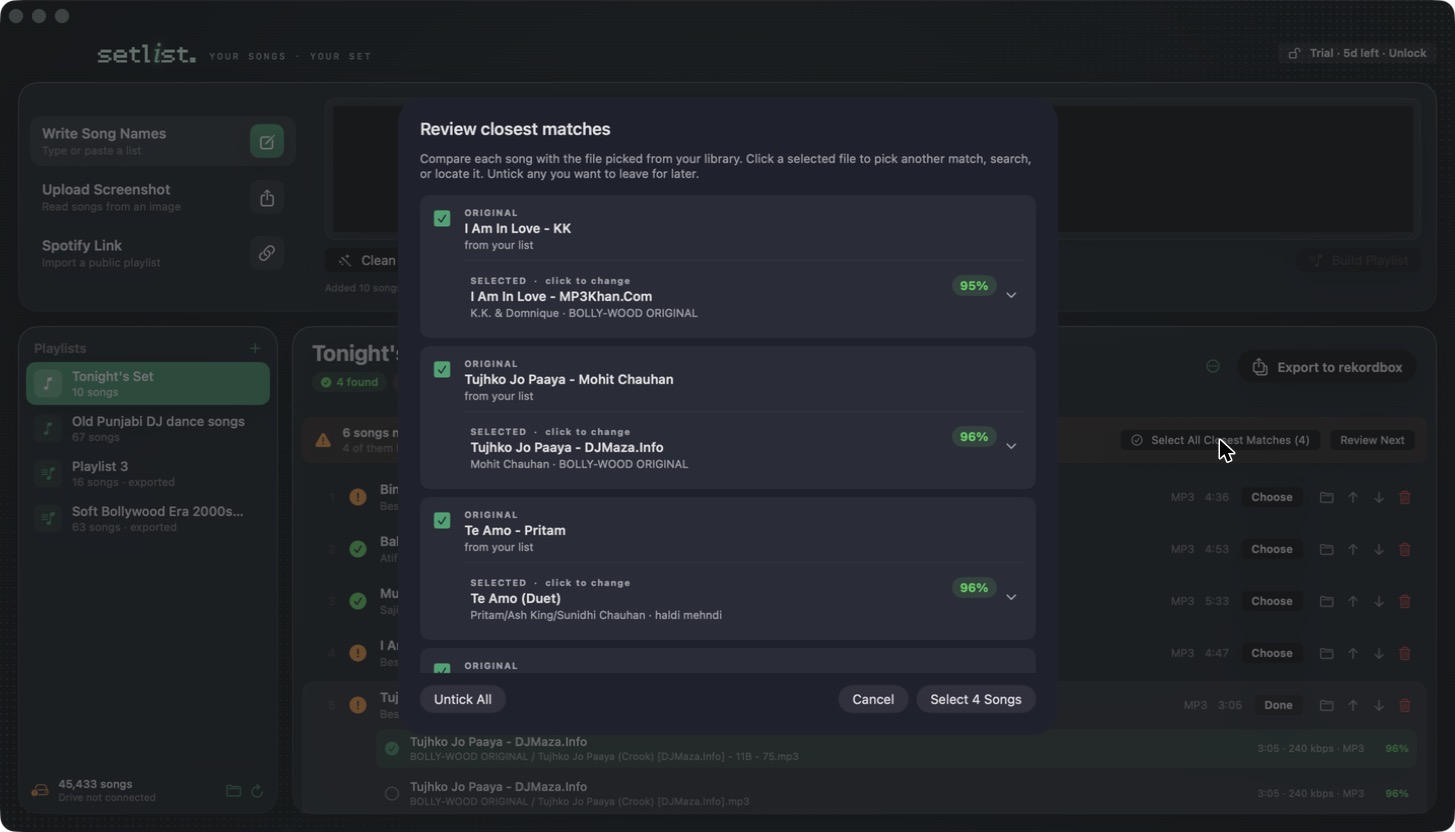
See it in action
Built by a DJ, for the hours before a set.
From a client's last-minute request to a playlist in rekordbox, without searching a single folder.
Pricing
One payment. Yours for life.
- No subscription. Pay once at the launch price and keep it.
- Launch price is locked in. Every version 1 update is included at no extra cost.
- Try before you buy. Full access for 5 days, then decide.
- Sign in with your email and order ID. No password, no account. Your purchase never expires.
One-time payment · lifetime license
- Unlimited playlists and exports
- Use it on 2 Macs at a time
- All version 1 updates included
- Email support, straight from the developer
Secure checkout by Dodo Payments · UPI, cards and local currencies
Install
Up and running in a minute.
- Download setlist, open the file and drag setlist into Applications.
- Open setlist. If macOS asks to confirm, go to System Settings → Privacy & Security and click Open Anyway. This is needed once.
- Allow access to your music drive when prompted. Your library is indexed on your Mac.
- Your 5-day free trial starts when you first open the app. No sign-up.
FAQ
Questions, answered.
Does setlist move or copy my music?
No. It reads your files and writes a playlist file that points to where they already are.
Are my cues and beatgrids kept?
The playlist points to your existing files, so tracks already in your rekordbox collection keep their cues, loops and beatgrids. New tracks are analysed by rekordbox as usual.
Do I need an internet connection?
Only to sign in. After that, matching and exporting work offline, so a gig with no Wi-Fi is fine. setlist checks in quietly when you're online and keeps working for 30 days without internet.
Can I use it on more than one Mac?
Yes, on 2 Macs at a time. Sign in with the email you bought with and your order ID. To use a third Mac, sign one of the others out from the unlock screen.
Are long Spotify playlists supported?
Spotify's public page shares the first 100 tracks. Add the rest with a screenshot.
Is Windows, Serato or Traktor supported?
Not yet. setlist currently supports Mac and rekordbox.
Can I get a refund?
All sales are final. That's why you get 5 days of full access first, so you can test setlist with your own library before buying. See the refund policy.
Launch offer ends soon
Lifetime access at a quarter of the price.
The launch price won't return once the offer ends.